Astron Cleaner: focused storage and photo cleanup for Android users
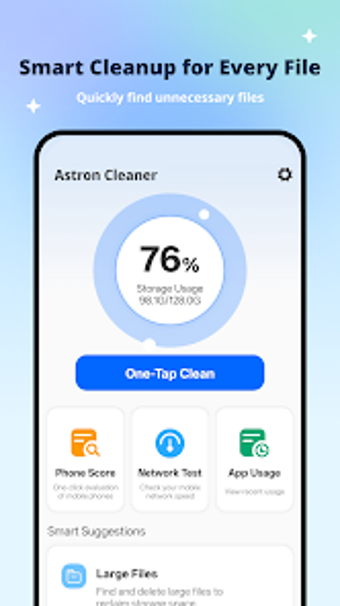
Scans device storage for junk, locates duplicate files and similar photos, and presents installed apps for removal in a single workflow. Astron Cleaner, from vttStudio, packages a One-Tap Clean, Duplicate File Finder, Similar Photo Cleaner, and App Manager into one Android utility. The app highlights screenshot management and large-file detection, making it suited to users who keep big photo galleries or many installed apps and want straightforward maintenance.
What Astron Cleaner actually does and who benefits
Astron Cleaner inspects Android storage to identify redundant and space-hogging items: duplicate files, large files, similar photos, and screenshots. The interface groups these results so users can take action on selected items, and it exposes an App Manager for uninstalling apps. The tool targets people with extensive photo collections or many apps, since its advertised specialties include similar-photo and screenshot management alongside general file cleanup.
Does it slow down your device during maintenance?
The source notes a One-Tap Clean that performs a quick scan, which implies short, foreground operations rather than long background jobs. Because the app is described as a lightweight package for Android, users can expect brief scans for routine cleanup. The documentation does not list CPU or RAM figures, so exact system impact is unspecified; expect normal scan activity to use measurable resources while it enumerates files.
Is Astron Cleaner safe to run on a daily device?
The app identifies items such as duplicates and large unused assets and presents them for deletion, which means user confirmation is needed before removal. There is no mention of automatic system-level changes or a forced write to protected storage, and the design centers on selection-based cleanup. Given that, the tool operates as a user-driven cleaner rather than an automatic modifier of system files, reducing the chance of unintended deletions when the user reviews results.
Suitable for casual users with big galleries; proceed with normal caution
Astron Cleaner fits Android users who want straightforward storage upkeep and targeted photo or screenshot management. Public ratings are limited, so the app is still building its user base; try it on a device where you can review deletions before committing. For those with large galleries, schedule maintenance during idle hours to avoid interrupting active tasks. Recommended.